Built to order
The quarter's serving schedule, in minutes.
Four times a year somebody in the church office opens a spreadsheet and builds the serving schedule: nursery, kids, greeters, worship, sound, slides. Who is trained for what, who is away which Sunday, who served last week, which families want the same Sunday, and, in every children's room, the church's own safety rule about who may be in it. It takes an evening, and then someone texts on Saturday night to say they cannot come.
This is the tool that builds that schedule in a moment, shows its reasoning for every name, leaves a slot open and says why rather than break a rule, and on Saturday night finds the best substitute without moving anyone else. Everything below is computed live, in your browser, by the same engine the real one runs.
Redbud Fellowship is invented, and so is every volunteer, household, date and clearance on this page: 62 made-up people over 13 Sundays. The children in the rooms are never named in the tool. Nothing you change here is saved or sent.
Open, with a reason Moved in the last change The person you picked
Open slots, and why
How often each volunteer serves
Sundays serving this quarter What they offered One bar per volunteer; tap a bar to see that person.
One volunteer
Rules that are never broken
These have no switch. When one cannot be met, the slot stays open and says why. The child-safety rules are the church's own written policy, entered at setup.
Preferences the church weighs
Each one costs points when it is not met. Switch one off or move its weight and the quarter is re-solved.
What comes out
One document from one run of the engine: the quarter as first solved above. Page one goes on the wall. The pages after it are cut into a card for each volunteer.
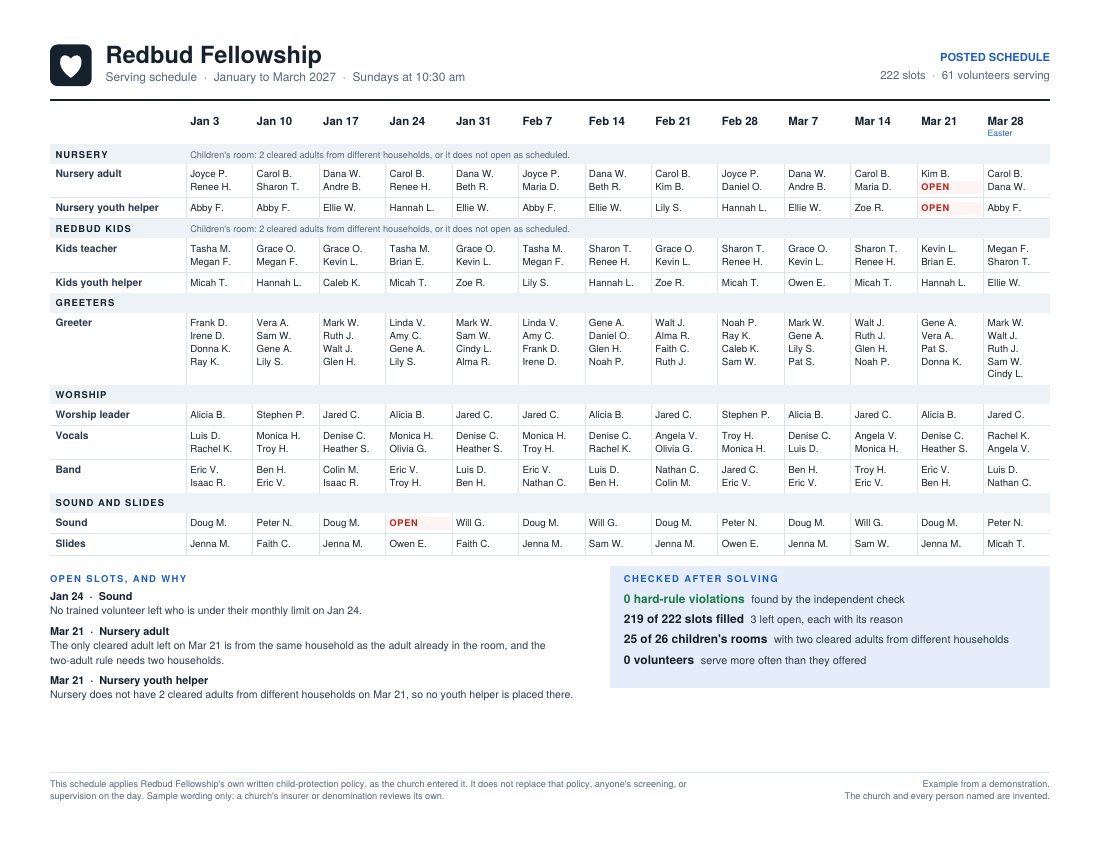
Download the sample schedule (PDF, 8 pages)
The posted schedule: 219 of 222 slots, the 3 left open with the reason for each, and what the independent check found (0 hard-rule violations).

“Your dates”: a card for each of the 61 volunteers who serve, with every date, the position, and who they are serving beside.
How it decides
Some rules are never broken
Only trained people in a position. Only adults with a current clearance in a children's room, and at least two of them from different households, with youth helpers never counted toward the two. Nobody in two places at once, nobody on a date they are away, nobody over their monthly limit.
When a slot cannot be filled inside those rules it stays open, and the schedule says exactly why.
The rest is weighed, your way
How often each person asked to serve. No back-to-back weeks. A fair spread, so the same willing few are not worn out. Families who asked for the same Sunday. Parents of little ones not both out of worship. A new volunteer beside an experienced one. A leader in each room.
Each has a weight the church sets. The hardest slots are filled first, then the schedule is improved one change at a time until no single change makes it better.
Then it is checked again
A second piece of code, written separately from the solver, reads the finished schedule and tests every hard rule from scratch. Its count is the number on the first tab. On this quarter it is 0, and the page would not have been published otherwise.
Saturday night uses the same rules: one seat is refilled, every other name stays put.
Read this before you rely on it
- The tool applies your church's own written child-protection policy and the clearance dates you enter. It does not replace the policy, the screening itself, or supervision on the day. A schedule that passes the check is a schedule that matches what was entered, nothing more.
- The only thing kept about anyone's screening is a “cleared through” date. No report, no details. The children in the rooms are never named. Youth helpers are volunteers and are listed like any other; the full build will record a parent's consent for each.
- The rule wording on this page is sample wording: a placeholder for your church's insurer or denomination to review before it is used.
- It finds a good schedule, quickly, and shows its work. It does not claim the best possible one, and the coordinator can always overrule it.
- The text message is a preview. Nothing on this page is sent. Texting volunteers needs their consent first.
What the full build adds
This page is the engine and its screens. The program around them is what a church office will use every week. None of the following is on this page; it is planned work.
Your roster, loaded once
The full build will import your volunteer list from the spreadsheet or the church-management export you already keep, so nobody retypes names. Which systems it will read from is one of the first things we will ask.
Volunteers answer from a text
Planned: each volunteer who has agreed to texts will get a link to confirm their dates, mark a Sunday they are away, or offer a swap. The substitute request on the Saturday night tab will go out the same way, to one person at a time, in the order shown.
Reminders, and a record
The full build will send a reminder a few days before each date, keep every posted schedule and every change with who made it, and warn the office before a clearance runs out rather than the week after.
Your teams, your services, your policy
More than one service on a Sunday, midweek teams, and one-off events are planned on the same rules. The schedule will print on your letterhead, and your written policy, as your insurer or denomination has approved it, will be what the hard rules enforce.
Bring last quarter's schedule.
Send the roster and the schedule you built by hand. We will load your people and your rules, solve the same quarter, and set the two side by side: who served how often, which rooms were short, and how long each one took to make. If it cannot do better on your own quarter, we will tell you that too.