Built to order
Quote it from the model.
A request for quote lands with a STEP file. Somebody opens the model, turns it over, guesses a cycle time, prices the stock, works out four quantity breaks and types it all up. It is the slowest job in the front office, it is usually done by the one person who can least be spared, and a wrong number costs the shop either way: too high loses the job, too low wins it.
This is the tool that does the first pass. It measures the model, picks the stock and the routing, builds the cycle time, and prices the lot on the shop's own machine rates. Then it stops and waits: nothing is a quote until the estimator has looked at the flags and approved it. Every number below is computed live by the same engine the real one runs.
Blackfork Fab & Machine is invented, and so are its rates, its customer, the five parts and every price. The rates are sample settings, not market prices and not anyone's shop. The parts are real STEP files we drew for this page, and the measurements are really taken from them.
What the reader measured in the STEP file
The draft quote
| Qty | Each | Lot | Ships in | Band |
|---|
For reference only: no machine here holds this part.
No review flags on this part. It still waits for the estimator's approval.
Unit price against quantity
The price: cheapest routing through this shop Confidence band Each routing on its own
Cost teardown
Price for the lot—
How the price was built
Machines
Material, as bought
Rules
Everything else the owner sets
What comes out
Two documents from one run of the engine. These are the housing from the guided run: blocked as modeled, quoted with a stated corner radius, ticked and approved.
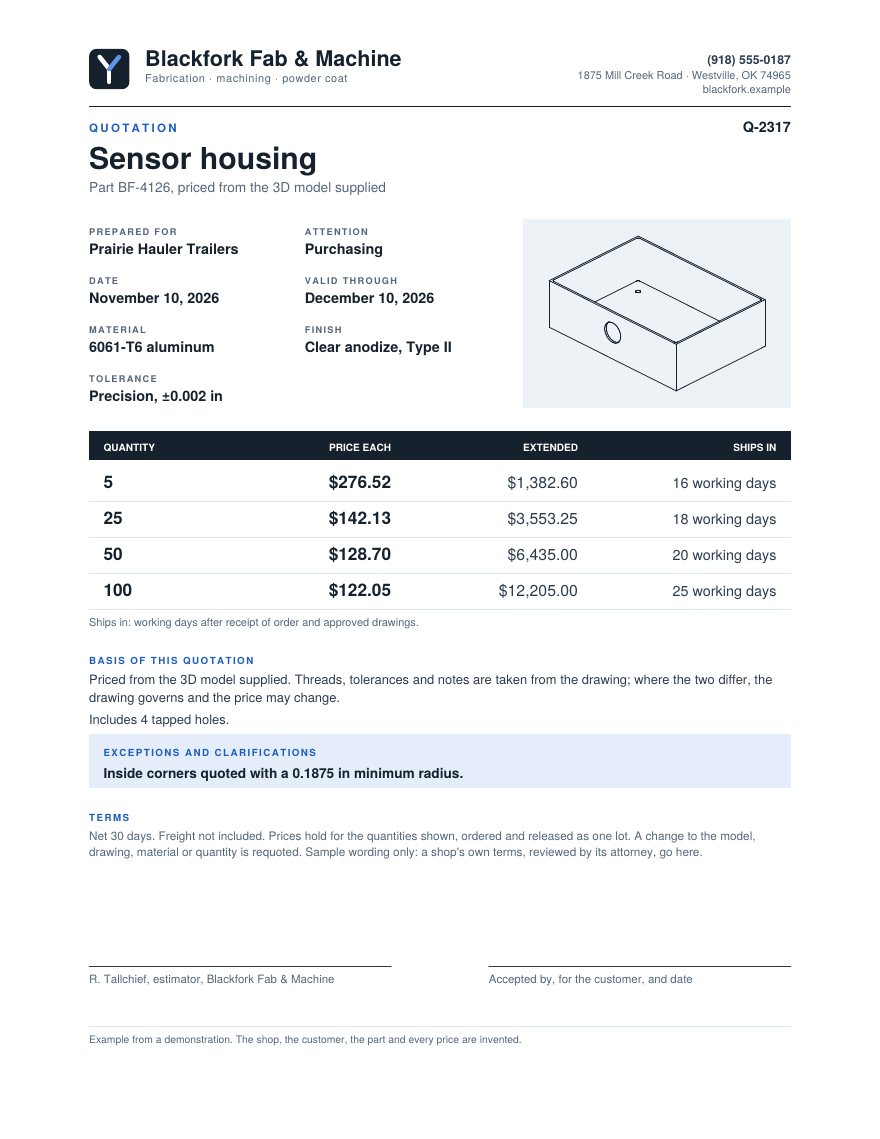
The customer's copy, on the shop's letterhead: the part, the price at each quantity, when it ships, what it was priced from and the one exception. No rates, no cycle times, no margin.
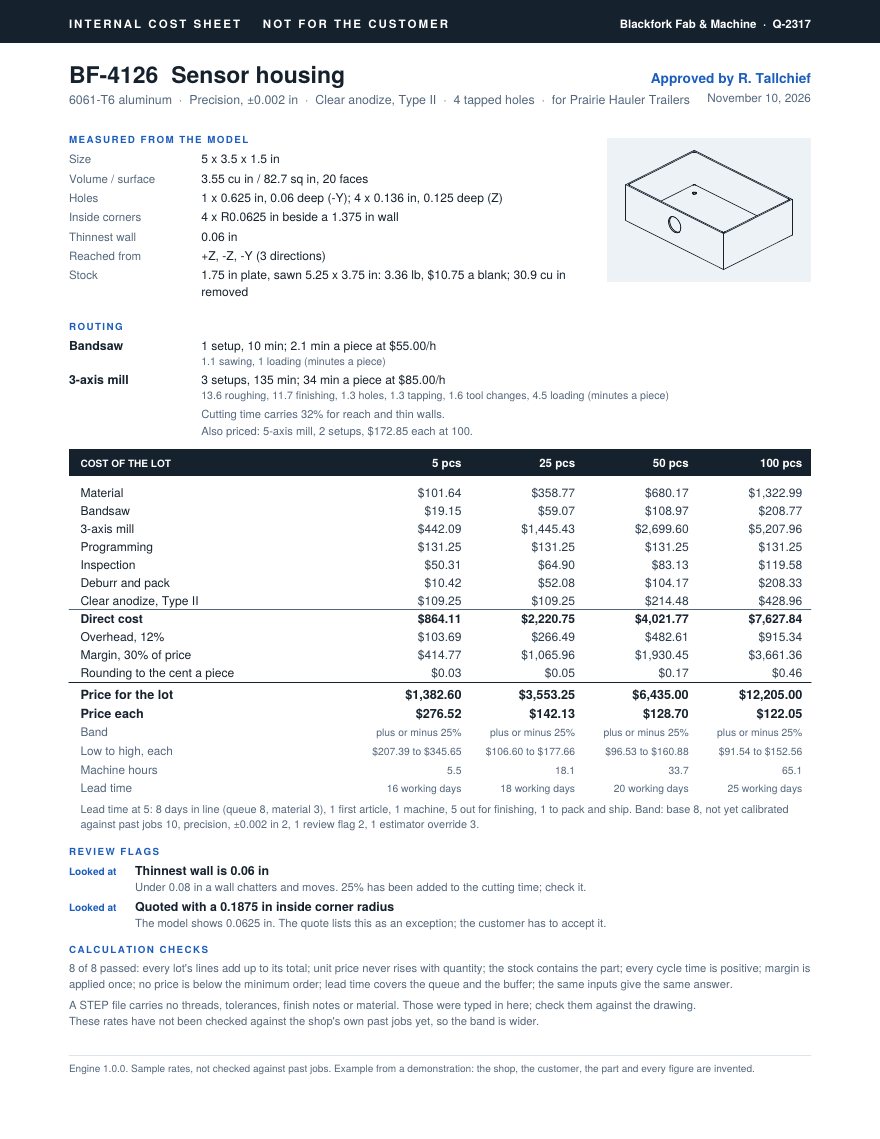
Download the internal cost sheet
The shop's copy: what the reader measured, the routing, every cost line at every quantity, the band, the flags the estimator ticked, and the checks the arithmetic passed.
How it gets to a number
It reads the solid
Size, volume and surface. Every hole with its diameter, depth and which way it opens. Inside corner radii and the height of the wall beside them. The thinnest wall. And the fewest directions a 3-axis machine has to come from to reach every face, which is the setup count.
Drop a part in and those are measured from your file, in your browser.
It prices it your way
The smallest stock on your list that contains the part. Roughing from the volume that comes off, finishing from the surface, each hole on its own, tool changes and loading. Setups, programming and first article spread over the lot. Then scrap, overhead, margin once, and your minimum order.
Every routing your shop could run is priced, and the cheapest one wins at each quantity.
It knows when to stop
A part no machine here holds. A pocket too deep for the cutter that fits its corners. A wall too thin. A finish that does not suit the material. Those block the quote outright. Tight tolerance, thin walls and anything the estimator overrode need his tick, one by one.
Then a named person approves it. Not before.
Read this before quoting anyone
- The rates on this page are sample settings. Out of the box, an engine like this lands in the neighborhood; it earns trust by being checked against jobs the shop has already run, and until then the band says so.
- A STEP file carries no threads, tolerances, finish notes or material. Those are typed in from the drawing by a person, and the drawing governs.
- The reader handles flats and cylinders well. Sculpted surfaces are flagged, not timed.
- The output is always a draft. A wrong quote costs the shop money, so the tool never sends one. The estimator does.
What the full build adds
This page is the engine and the reader. The program around them is what an estimator will use every day. None of the following is on this page; it is planned work.
Calibration against your past jobs
Before go-live the full build will replay jobs you have already run, set your rates and factors until its numbers match what those jobs took, and show you the before and after. After that it will keep score: quoted hours against actual, job by job.
The quote log, and what was won
Every quote will be saved with who approved it, how long it took, and whether it was won. That log is where a shop will see its win rate by customer and by kind of part, measured rather than remembered.
Lead time from the real load
Here, lead time is a simple rule the owner sets. Paired with a shop capacity planner, the full build will take the routing hours from the quote and load them against the open jobs on each machine, so the date on the quote is one the floor can hit.
Your letterhead, your terms, your files
The quotation will carry your logo and your attorney's terms, and go out as a PDF by email once approved. Assemblies, drawings beside the model, more machines and more outside processes are planned. It will run where your customers' models are allowed to be.
Bring ten jobs you have already run.
Send the models and what each job actually took. We will load your rates, run the ten through, and show you line by line where it lands against what happened. If it cannot get close on your work, we will tell you that too.